BETA 0.1 VST3 · AU · Standalone for macOS and Windows
Hear the soundtake shape.
Vaelis is a subtractive synthesizer for people who take their sound seriously. Character, immediate response and a clear interface, so you spend less time configuring and more time creating. A synthesizer that follows your music, from the first sketch to the final version.
2 parts · A/B294 automatable parameters16 arp steps7 effects
Subtractive Synth8 waveformsUnison up to 8 voices12 / 24 dB filterModulation matrix16-step arpeggiatorDelay · Reverb · ChorusImports .fxb / .fxpSubtractive Synth8 waveformsUnison up to 8 voices12 / 24 dB filterModulation matrix16-step arpeggiatorDelay · Reverb · ChorusImports .fxb / .fxp
2parts playing together: a pad underneath, a lead on top
8waveforms per oscillator, with unison up to 8 voices
16arpeggio steps you draw by dragging the mouse
294parameters to automate in your DAW, each with its own unit
Features
Everything you expect from a subtractive synth. Nothing in the way.
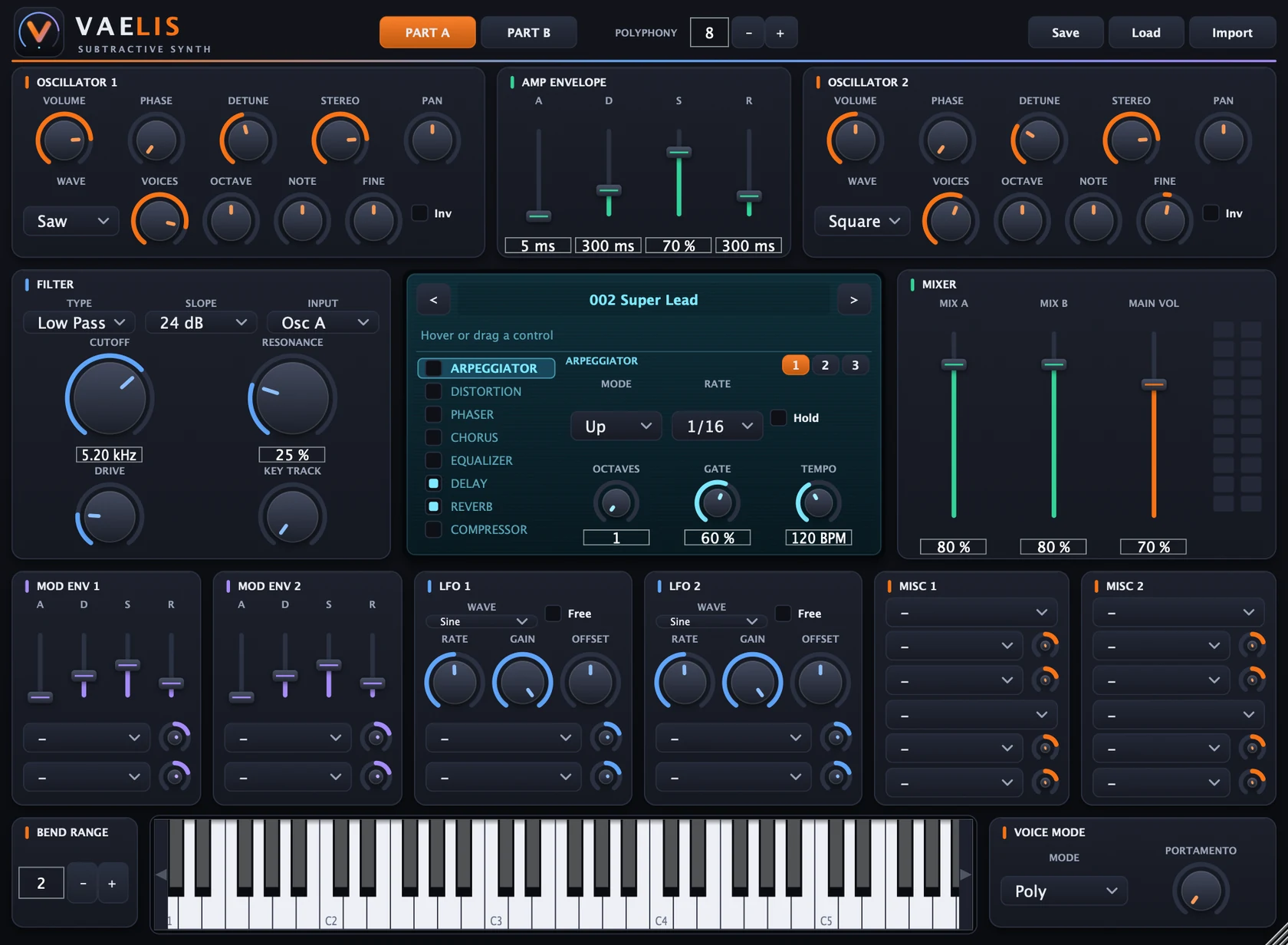
Classic signal flow, large knobs and a central display showing the value of every parameter you adjust. You never have to guess.
Two parts, one sound
Part A and Part B each have their own oscillators, filter, envelopes, LFOs and modulation, and they play at the same time. Stack a pad with a pluck, or a bass with a lead, and balance them in the mixer.
Part A2 osc · filtro · amp env 2 Mod Env · 2 LFO · 4 Misc
Part B2 osc · filtro · amp env 2 Mod Env · 2 LFO · 4 Misc
Oscillators with weight
Saw, Square, Triangle, Sine, Noise, Pulse 25, Pulse 12 and TriSaw. With up to 8-voice unison, detune and stereo spread, a simple lead gains body and width in a few adjustments.
A filter that answers right away
Low Pass, High Pass, Band Pass and Notch, at 12 or 24 dB, with Drive, Resonance and Key Track. Turn the cutoff and hear the change that instant, with no stepping.
Modulation, straight to the point
Per part: 2 Mod Envs, 2 LFOs and 4 Misc blocks with mod wheel, aftertouch and more. Each source has 2 destinations. Movement in the sound without needing a diagram.
Mod Env 1·2LFO 1·2Misc 1–4Mod WheelAftertouch
Automation that never pops
Cutoff, resonance, levels and effects are smoothed. Switching an effect on is a crossfade, not a cut. If you want proof, the measured numbers are just below.
An arpeggiator you draw
Up, Down, Up/Down, Random, As Played and Chord, with 11 timing resolutions (including triplets). Every step has transpose, velocity and tie, and the grid is made for drawing patterns by dragging, not clicking one at a time.
This is an interactive replica of the Vaelis step editor. Click and drag across the bars to draw several steps at once, use the arrow keys and turn the knobs. The idea becomes clear in seconds.
Vaelis has its own test suite that runs without a DAW and measures what you would hear: automation stepping, clicks and whether the project comes back as it was.
Clean automationSweeps of cutoff, resonance, volume and effects measured by FFT, all below −60 dB of stepping noise.
No clicks on voicesVoice stealing and mono retrigger pass through a declick of a few milliseconds.
Projects come back the way you left themEvery parameter is restored exactly when you reopen a project. Corrupt state is rejected without freezing.
Validatedpluginval at level 10 (VST3 and AU) and auval on the Audio Unit.
Plugin for macOS and Windows, every preset, the manual and all updates. Install on up to two computers and manage everything from your dashboard, no support ticket needed.
Automatic renewal and secure payment through Stripe. You manage or cancel the subscription from your dashboard, whenever you want. Before subscribing, try Vaelis free for 7 days, no card needed.
Frequently asked questions
Common questions
Does it work in FL Studio, Ableton and other DAWs?
Yes. Vaelis is VST3 (and Audio Unit on Mac), formats accepted by most DAWs. It was built with automation and project recall in mind, and passes pluginval at level 10. As it is still in beta, testing in real DAWs continues: if something behaves unexpectedly, send a report with the DAW and what you were doing.
What are VST3, AU and Standalone?
VST3 is the plugin format used on Mac and Windows. AU (Audio Unit) is the native Mac format, used for example in Logic. Standalone is an app that opens on its own, with an on-screen keyboard, so you can try the sound without a DAW.
Can I import presets from other synthesizers?
Yes, compatible .fxb banks and .fxp programs, as long as you have the files and the right to use them. Conversion is approximate, and the preset menu tells you which modulation destinations were not reproduced. Details are in the manual import section.
What do I need to install on Windows?
Nothing besides the plugin itself: the runtime is bundled. Run Instalar.bat. Because the beta is not paid-signed, Windows may show “Windows protected your PC”: click “More info” and “Run anyway”.
What about Mac? Will I see a security warning?
The beta is signed ad hoc, without Apple notarization. Right-click Instalar.command, choose Open and confirm once: it installs the VST3 and the AU and clears quarantine. The manual walks through the steps.
Is there MIDI learn?
Not yet. Use your DAW automation: all 294 parameters show up there, with units (Hz, ms, dB, %). Pitch bend controls pitch, and mod wheel (CC 1) and aftertouch become modulation sources.
Is the demo audio on the site the plugin?
No. The arpeggiator demo runs with Web Audio in the browser and shows how step editing works. The real sound is the plugin.
Can I try it before subscribing?
Yes. Create an account and start the 7-day free trial, no credit card required. You get a serial right away, download the installer and activate it on one computer. The full plugin is unlocked for the whole period. When you subscribe, the same serial keeps working and starts accepting two computers.